What's New
How to Vet a Musician Before You Collaborate (Introducing Credibility Badges)
By the Bandry Team · Jun 9, 2026 · 6 min read
You found them on the bulletin. A producer who says they've worked on records. An engineer offering mixes. A drummer who claims they've toured. The post reads well. But before you hand over your contact, your stems, or a Saturday rehearsal slot, there's one quiet question sitting under all of it: are they actually for real?
Online, anyone can say anything. The usual stand-in for proof is a follower count, which tells you nothing, or a long back-and-forth where you try to feel out whether someone's legit before you commit. Neither one works. So we built something that does.
Introducing Credibility Badges
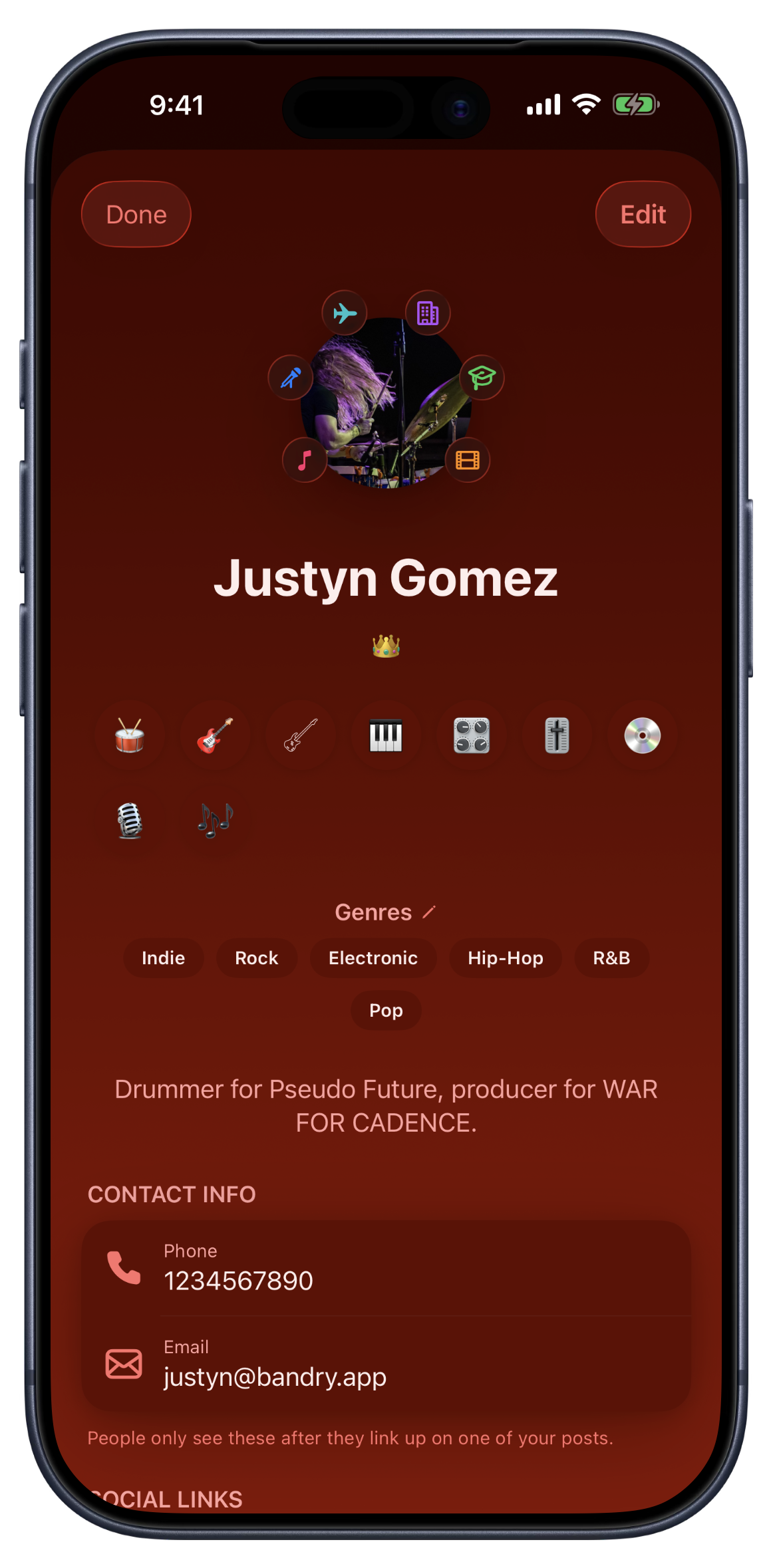
Credibility badges are a small, curated set of credentials that ring a musician's profile photo, so you can read someone in a glance, before you ever reach out. They aren't free text you can write anything into, and they aren't a popularity score. They're a fixed list of the things that genuinely signal a working musician, and they mean the same thing on every profile you see.
Six Signals That Actually Mean Something
There are six, and each one maps to a real marker of someone who does this for real:
- Released Work, music out on a streaming service.
- Session Credits, paid or credited work on other artists' recordings.
- Touring, shows played beyond a home city.
- Pro Studio, runs a professional recording or rehearsal space.
- Educator, teaches lessons, workshops, or clinics.
- Sync / Placement, music placed in film, TV, games, or ads.
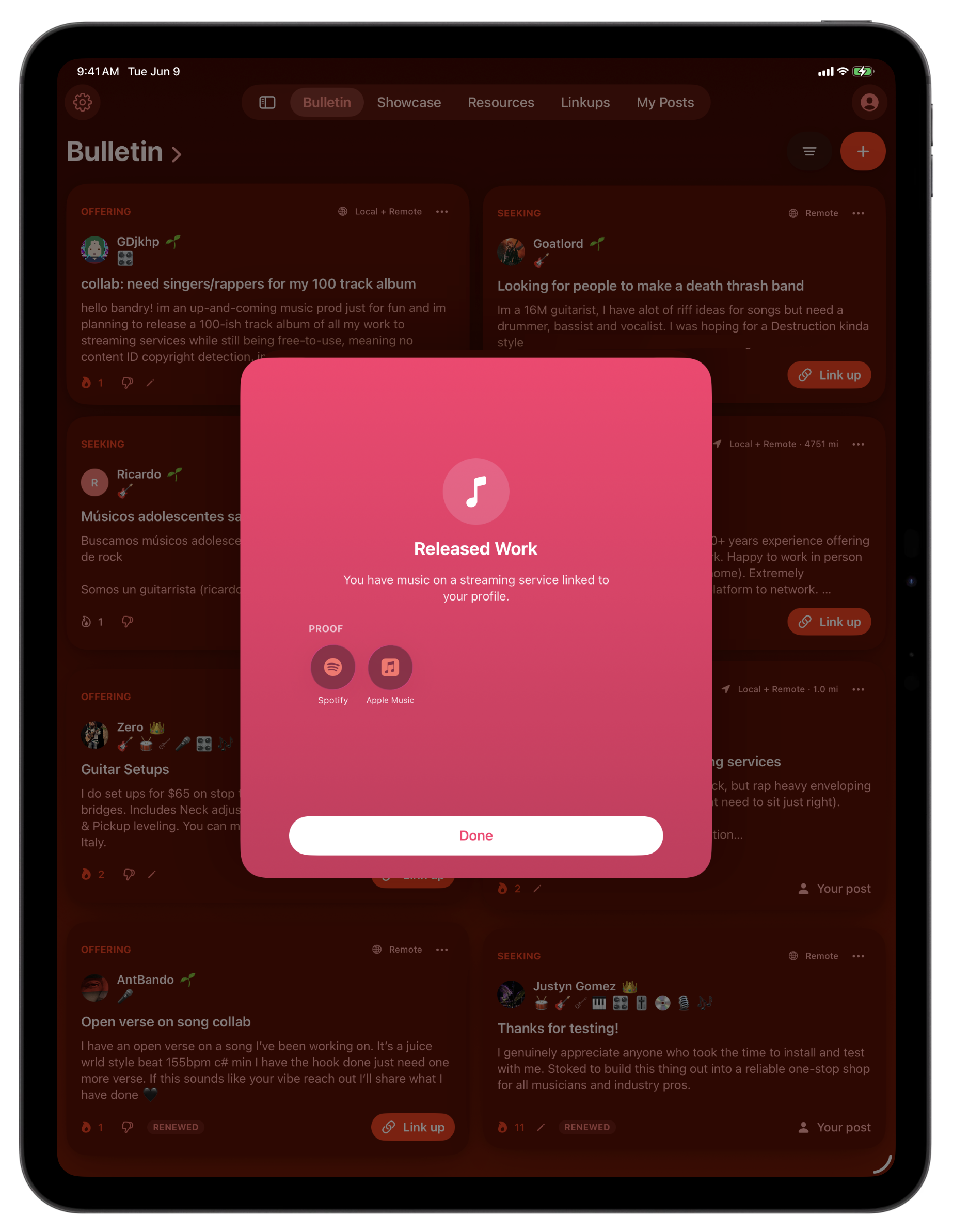
Released Work earns itself: link a Spotify, Apple Music, Bandcamp, or SoundCloud profile and the badge appears on its own, which means it can't be faked. The other five you set yourself, on your profile or right when you sign up. It takes about a minute.
The Part That Makes Them Trustworthy: Proof
A badge you can't back up is just another claim. So every badge is tappable, by you and by anyone looking at your profile. Tap one and it opens to show what it means and, more to the point, the proof behind it: the actual released music, the studio, the placement, whatever substantiates it. Tap Released Work and you see the streaming profiles it's drawn from. It turns "trust me" into "here, look."
No Follower Counts, On Purpose
You'll notice what isn't here: a follower number, a monthly-listener flex, a like total. The industry stopped trusting those a long time ago, and so did we. Credibility on Bandry is about what you've done, not how many people happen to be watching. It's the same reason your press kit leads with real rooms and real press instead of vanity stats, and the same reason Showcase feedback is private and earned. The whole platform is built to reward substance over noise.
Why It Matters Right Before a Link-Up
On Bandry, the only way to reach someone is to tap Link up, which hands them your contact info, one direction, no inbox to spam. Badges make that decision faster and safer for everyone involved. Before you raise your hand, you can see at a glance that the engineer has session credits and released work, or that the person offering "studio space" actually runs a room. Less guessing, fewer dead ends, more of the connections that go somewhere.
Also New: Close the Loop on Your Posts
A few more things landed alongside the badges, and they're all about the same idea: knowing where things stand. The first is marking a post done. When one of your posts has done its job, you can mark it done instead of just deleting it. Filled the drummer spot? Mark it Completed. Sold the pedal or worked out a trade? Mark it Sold or Traded. The post gets a badge, leaves the active board, and frees up one of your slots, a cleaner way to close things out than letting a stale post sit there reading as open when it isn't.
And Everyone Who Linked Up Hears Back
The second fixes a small but real annoyance: silence. When you mark a post done, everyone who tapped Link up on it gets a heads-up that it's closed. No more raising your hand on a post and wondering for two weeks whether it's still live. If the spot's filled or the gear's gone, you find out, so you can stop waiting and move to the next one. The tap is still the only message, we just made sure the loop actually closes.
Your Post Insights Now Coach You
Your private analytics got smarter too. Open the insights on one of your own posts, the same place you already check views, fires, and link-ups, and you'll now find a few plain-spoken tips under the charts, built from how that post is actually doing. Not many people have seen it yet? It'll suggest widening your radius or posting Remote. Getting views but no raised hands? It'll tell you to sharpen the ask. Forgot to tag the role you're looking for? It catches that too.
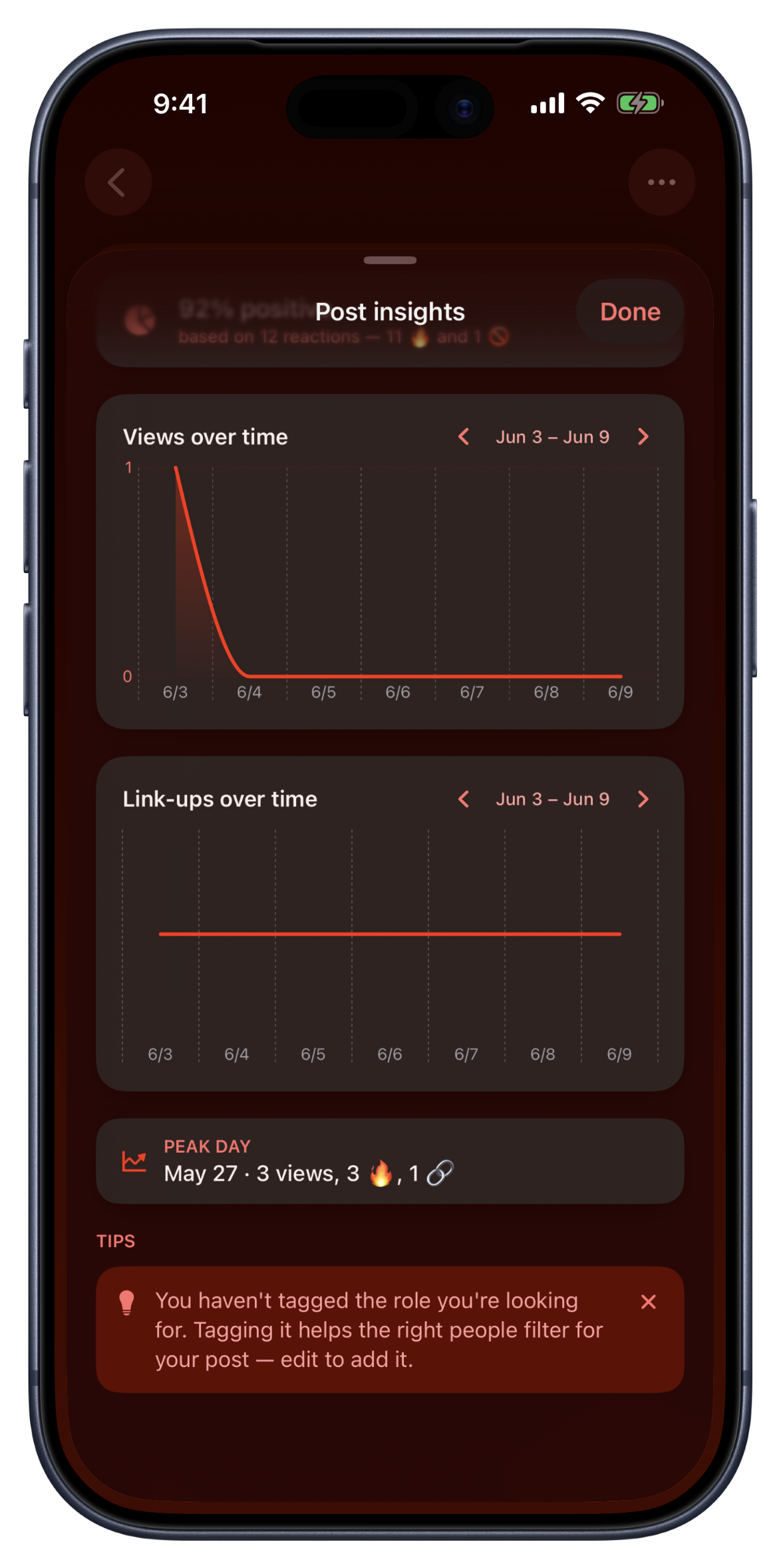
Every tip is a simple rule running on your own post's numbers. No AI, no comparing you to anyone else's posts, no algorithm deciding anything. Only you see them, and any tip you don't want is one tap to dismiss. It's the difference between staring at a flat chart and knowing what to do about it.
And Your Mixtapes Count Their Plays, Just for You
Mixtapes got their own addition: a Plays over time graph in your mixtape insights, right next to fires. Every time someone taps Play on one of your mixtapes, it counts, quietly, toward a total only you can see. Your own plays don't count, so the number is real.
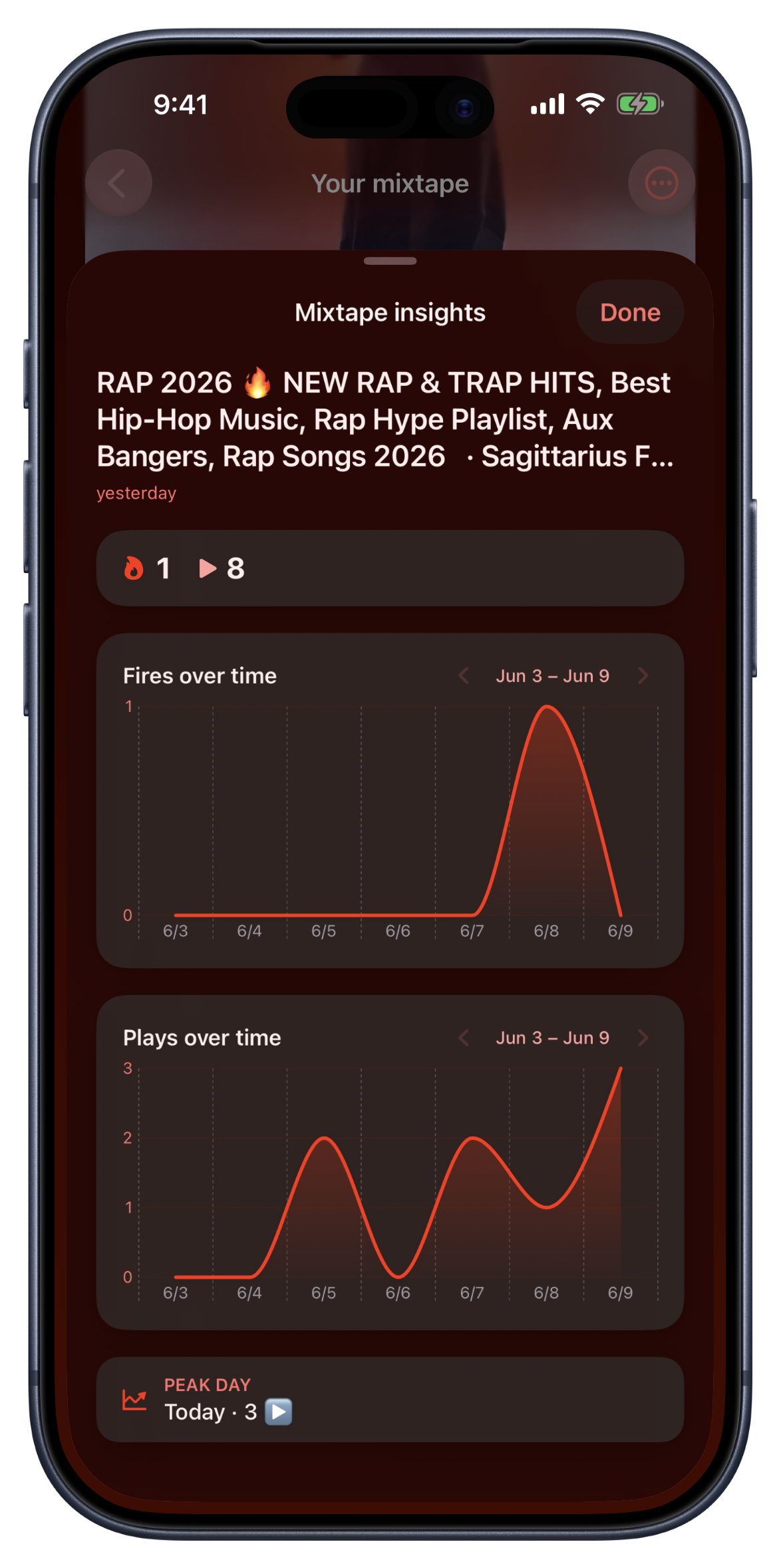
And before anyone asks: no, this doesn't put a play count on your mixtape. Nothing changed publicly. Bandry still shows no follower counts, no listener counts, no play counts anywhere, because the moment numbers go public they become the product. These are your numbers, for you, so you know which mixtapes are landing and what to share next.
Set Yours in a Minute
Open your profile, find your badges, and toggle on the ones that fit. Link a streaming profile and Released Work shows up on its own. New to Bandry? You'll be prompted to set them right after you sign up. Then drop a post, let the insights coach you, and go find the people worth linking up with, now you can actually tell who's who. Ready to start? Get started here.
Frequently asked questions
What are credibility badges on Bandry?
Credibility badges are a small, curated set of credentials that ring a musician's profile photo, so you can size someone up at a glance before you reach out. There are six: Released Work, Session Credits, Touring, Pro Studio, Educator, and Sync / Placement. They're a fixed list, not free text and not a popularity score, so they mean the same thing on every profile.
How do I add credibility badges to my profile?
Open your profile and toggle on the badges that fit. Released Work adds itself the moment you link a music-streaming profile like Spotify or Apple Music. If you're new to Bandry, you'll be prompted to set your badges right after you sign up, alongside your name, roles, and links. Pro Studio only appears if you list the Studio role.
Can I see the proof behind someone's badges?
Yes. Every badge is tappable, by you and by anyone viewing your profile. Tap one and it opens to show what it means and the proof behind it: the released music, the studio, the placement, whatever backs it up. Released Work shows the streaming profiles it's drawn from. It turns a claim into something you can actually check.
Do Bandry profiles show follower or play counts?
No, and that's on purpose. You won't find a follower number or a monthly-listener total anywhere on Bandry. The industry stopped trusting those, so credibility here is about what you've actually done, released work, real credits, real rooms, not how many people are watching.
How is the Released Work badge earned?
Automatically. Link a music-streaming profile to your Bandry account, Spotify, Apple Music, Bandcamp, SoundCloud, and the Released Work badge appears on its own, with those links as its proof. You don't toggle it; it's derived from your profile so it can't be faked.
What does it mean to mark a post as done?
When one of your posts has served its purpose, you can mark it done instead of deleting it: Completed on the bulletin, Sold or Traded on Market. The post gets a badge, leaves the active board, and frees up one of your slots. Everyone who tapped Link up on it also gets a heads-up that it closed, so no one's left waiting on a post that's already handled.
What are the tips on my post insights?
Open the insights on one of your own posts and you'll find a few private suggestions under the charts, based on how that post is actually doing: not many people have seen it yet, people are seeing it but not reaching out, you haven't tagged the role you're looking for, and so on. They're simple rules running on your own post's numbers, no AI and no data from anyone else's posts, and only you ever see them. Dismiss any tip you don't want.
Can I see how many people play my mixtapes?
Yes, privately. Mixtape insights now include a Plays over time graph: every time someone taps Play on one of your mixtapes it counts toward your private total (your own plays don't count). Only you, the curator, can see it. There are still no public play counts anywhere on Bandry, credibility stays about the work, not the numbers.